Yes. An employer can set an application question to reject you automatically, and most forms ask at least one question of the kind those rules are built on. On 3 October 2026, 68% of 152,929 open postings' application forms asked about work authorization or visa sponsorship, and 30% asked for a salary expectation. Where the ATS shows the setting, 40% of postings had a question marked as a knockout.
Greenhouse documents automatic rejection based on employer-configured answers to custom questions. Workable documents automatic disqualification when a candidate answers No to a configured yes/no question. These are per-job rules an employer sets, not a judgment of your resume. [1] [2]
How common are knockout-style questions?
JobShifu captures the application form behind every open posting on five applicant tracking systems, so the extension knows what a form will ask before you open it. Counting what those forms ask gives the table below. Each cell is the share of open postings whose form asks at least one question of that kind.
| ATS | Open postings | Sponsorship or work authorization | Salary expectation | On-site or commute | Relocation | Years of experience |
|---|---|---|---|---|---|---|
| Greenhouse | 97,895 | 72.5% | 31.9% | 15.4% | 12.1% | 11.4% |
| Ashby | 29,909 | 73.1% | 25.2% | 21.3% | 10.6% | 9.1% |
| Lever | 23,651 | 45.9% | 28.2% | 11.0% | 7.5% | 9.1% |
| Rippling | 1,464 | 49.8% | 36.7% | 19.8% | 5.3% | 6.6% |
| All five | 152,929 | 68.3% | 30.1% | 15.9% | 11.0% | 10.5% |
Measured 3 October 2026 on forms captured from 24 September. The total includes 10 Recruitee postings, too few to report on their own.
Three things stand out.
- Sponsorship is the most common screening question by a wide margin. 56.3% of forms ask about it directly, and on 52.7% that question is required. Counted by employer rather than by posting, 62% of the 7,377 employers ask it on at least one open role.
- A question being asked is not the same as a rule being set. Greenhouse, Ashby and Lever do not show whether an employer attached an automatic rejection to an answer. Rippling does: 40.4% of its postings, and 48.7% of its employers, had at least one question marked as a knockout, and a quarter of its postings had a knockout on work authorization or sponsorship.
- Per employer, the shares are higher. A large employer posting hundreds of roles counts once per posting above. Counted once per employer, 41.6% ask for salary, 34.3% ask about on-site work and 29.8% ask about years of experience. The full dataset has both views.
Workday, iCIMS and Taleo put the application behind an account, and SmartRecruiters blocks automated reads, so none of the four is in these numbers.
A real wrong answer, in our own autofill
In September 2026 we audited our own autofill against fifteen real applications and read back every value it had written. One Lever form asked, in effect, "You must be authorized to work without requiring sponsorship", with the options "Yes, I meet this requirement" and "No, I do not meet this requirement". The matcher saw the word sponsorship and filed it as a sponsorship question, where the safe answer for a citizen is No. Here, No meant "I do not meet the requirement". The extension answered No for an applicant who met it.
On a form with a knockout rule, that is a rejection the applicant never sees. We found a second Lever form inverted the same way in the captured forms, fixed both in the same change, and added a check that compares the actual values written to work-authorization and sponsorship fields, because the existing checks only counted how many fields were filled and stayed green through the inversion.
The lesson applies to any tool, including a careful human with a saved answer: the same fact can be the right answer to one wording and the wrong answer to the next. Read the options, not only the question.
Four things that can happen to an application
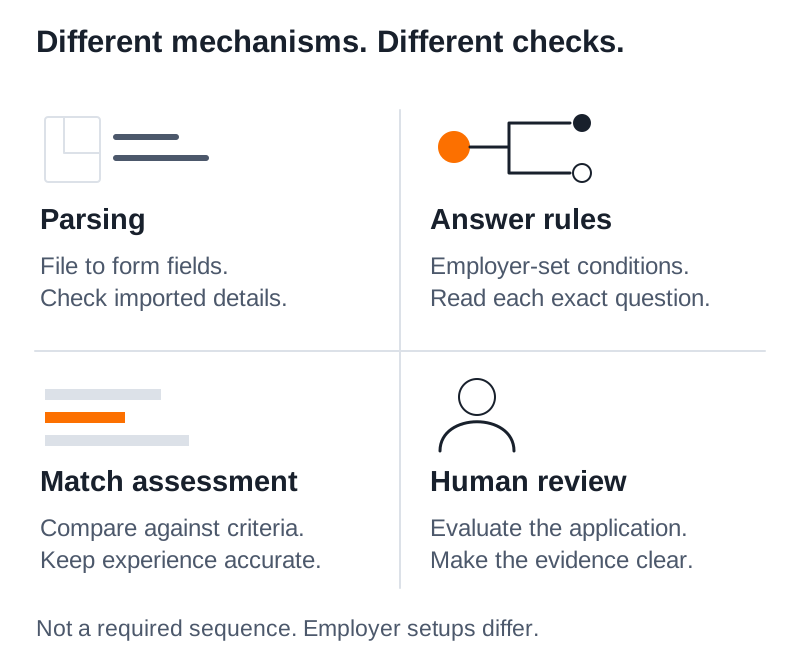
People often use "the ATS" to mean everything between Submit and an interview. Separate the steps.
| Process | What it does | What to check |
|---|---|---|
| Resume parsing | Extracts information from a document into fields | Names, dates, employers and other imported details |
| Application screening rule | Applies an employer's configured condition to an answer | Exact question wording and your selected response |
| Matching or scoring | Compares information with criteria to support evaluation | Whether relevant experience is recorded accurately |
| Human review | A person evaluates the application | Clear examples, context and readable writing |
These processes do not necessarily happen in this order. An employer may use some and not others.
Greenhouse's candidate FAQ makes an especially useful distinction: its Talent Matching feature provides an assistive match score and does not itself automatically advance or reject candidates. That can coexist with the separate answer-based rejection rules described above. [3]
Read the whole question before choosing an answer
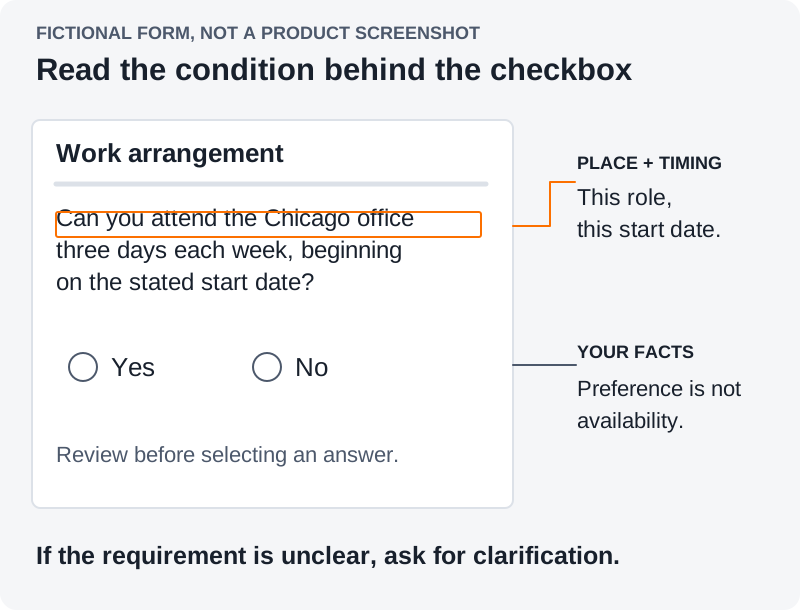
Consider this fictional example. A job description says "hybrid" and the application asks whether you can work at its Chicago office three days each week, beginning on the stated start date.
You currently live elsewhere and would consider relocating. A saved answer saying you are open to hybrid work does not resolve that specific question. Your answer needs to reflect whether you can meet this role's arrangement and timing.
If you can, answer accordingly. If you cannot, do not treat a resume rewrite as the solution. If the timing or location is unclear, look for clarification in the posting or ask a published recruiting contact before submitting, where possible.
Separate what you meet now, what you can meet by a stated date, and what remains uncertain.
Review these fields after autofill
Autofill can reduce repeated typing. It still needs a review against the current form. Greenhouse's candidate guidance advises checking imported information and correcting parsing mistakes before submitting. [3]
Start with these areas:
- Eligibility and availability. Read every condition attached to a yes/no answer. A question about today may differ from one about your possible start date.
- Dates and credentials. Check employment dates, graduation information and the status of required qualifications against your records.
- Numbers with units. Confirm that salary expectations, travel percentages and notice periods use the unit the form asks for.
- The attached resume. Open or preview the file where the form allows it. Confirm that it is the version intended for this role.
- Free-text examples. Make sure the answer addresses the question and describes work you actually did. Remove placeholders and unsupported details.
For ambiguous eligibility questions, seek clarification from the employer or an appropriately qualified adviser. Guessing which answer the system prefers is not a reliable way to establish eligibility.
A confirmation email is not a review decision
Workable says an automatically disqualified candidate still receives an application confirmation and may not know that disqualification occurred. A receipt therefore confirms submission, not necessarily that the application passed a screening rule. [2]
The reverse inference is also unsafe: a quick rejection does not identify the rule, score or person responsible. Unless the employer provides a reason, the mechanism remains unknown. Avoid repeatedly changing keywords to address an unconfirmed cause.
Save the answer and its context
Build a small record of reusable facts: the answer, when you last checked it, and any condition that changes it. Keep role-specific answers alongside the application they belong to.
JobShifu's Chrome extension supports application autofill and saved answers on supported forms. The user reviews and submits. In the web app, confirmed experience can also be saved in the Vault, a reusable master resume, for future tailoring. These features support preparation; they do not override employer rules or guarantee an interview.
For an older vacancy, first check whether the employer is still accepting applications. Then spend the final review on the actual questions as well as the resume.
Common questions
Should I change an answer after a rejection?
Correct a factual mistake through the employer's supported process if one exists. Do not change an accurate answer simply because you suspect it triggered a rule.
What percentage of job applications ask about visa sponsorship?
In our count, 56.3% of open postings' forms on Greenhouse, Ashby, Lever and Rippling asked about sponsorship on 3 October 2026, and 68.3% asked about sponsorship or work authorization. Lever (35.6%) and Rippling (38.0%) asked about sponsorship less often than Greenhouse (60.1%) and Ashby (61.3%).
Does answering every required question mean I passed screening?
It means you completed those fields. A completed form and an application receipt do not reveal every subsequent screening decision.
Data and citation
- What was counted. 152,929 open postings on Greenhouse, Ashby, Lever, Rippling and Recruitee whose application form JobShifu captured between 24 September and 3 October 2026, from 7,377 employers. One form per posting. Voluntary self-identification (EEO) blocks, hidden fields and display-only text are excluded.
- How a question is classified. By pattern on the question's label, for example "sponsor" or "visa" for sponsorship and "relocat" for relocation, with questions about current pay excluded from salary. The most frequent matched labels in every category were read before publishing.
- Asked, not enforced. Only Rippling publishes the employer's knockout setting. For the other systems these figures show how often a question is asked, which is the ceiling on how often an answer rule could apply.
- Disclosure floor. An ATS is reported on its own only with at least 1,000 postings and 100 employers.
- Aggregates only. No applicant answer, posting or employer name is published.
- Dataset. application-questions-2026-10-03.json, CC BY 4.0. Cite as: JobShifu, "Screening questions on job application forms, by applicant tracking system", measured 3 October 2026, jobshifu.com/blog/can-application-questions-reject-you.
Sources
- Greenhouse, Auto-reject, updated January 30, 2026; accessed September 15, 2026 (UTC).
- Workable, Auto-disqualify candidates using application form questions, accessed September 15, 2026 (UTC).
- Greenhouse, MyGreenhouse FAQ for Candidates, accessed September 15, 2026 (UTC).